
|
|||||||

|
|||||||
|
|||||||

|
|||||||
Manual | SMTP Authentication for Microsoft Outlook 2002
Setting up SMTP Authentication for Microsoft Outlook 2002
If your ISP does not provide SMTP server service for your use, you may use the Dollarhost mail server for SMTP. You will have to specify your Outlook 2002 software to authenticate in order for the SMTP server to accept your outgoing email.
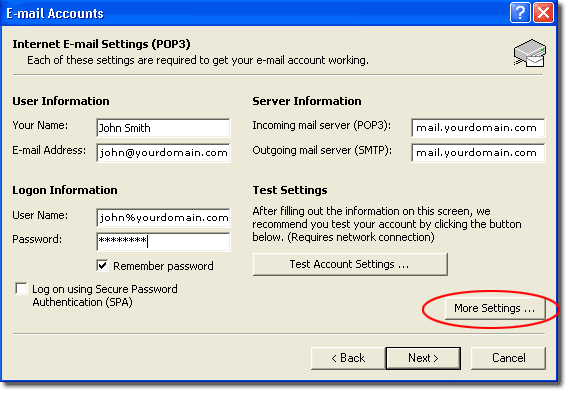
On your Outlook 2002 Internet E-mail Settings (POP3) page, enter mail.yourdomain.com as your Outgoing mail server (SMTP) and then click More Settings....
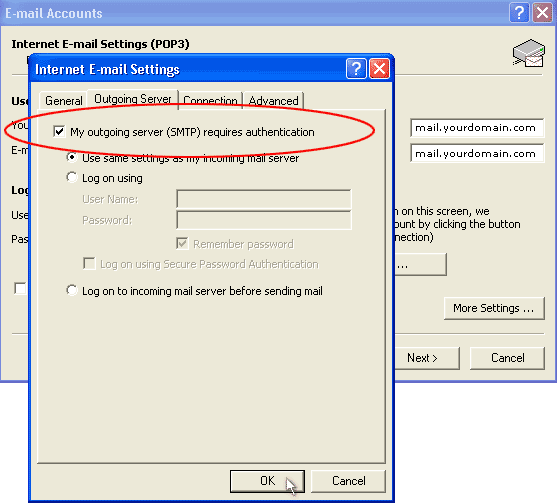
On the More Settings page, select the Outgoing Server tab, check the My outgoing server (SMTP) requires authentication option and then click Ok.
Congratulations! You have successfully configured your POP email software.
Copyright © 1995- Sidetrips™ Internet Services, Inc. All rights reserved.
Reproduction in whole or in part in any form or medium without express
written permission of Sidetrips Internet Services, Inc. is prohibited.
sidetrips.com™, hostserver.com™, registera.com™, htmlshop.com™,
and associated domains are trademarks of Sidetrips™ Internet Service, Inc.
Privacy Policy | Acceptable Use Policy | Terms of Service
